6MP Dual‑Lens Wireless CCTV Kit: 8CH NVR + Audio
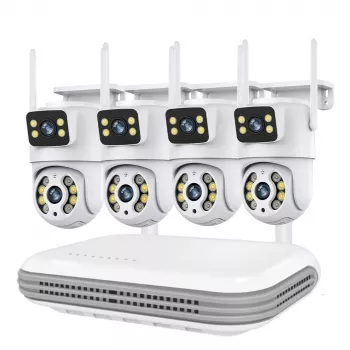
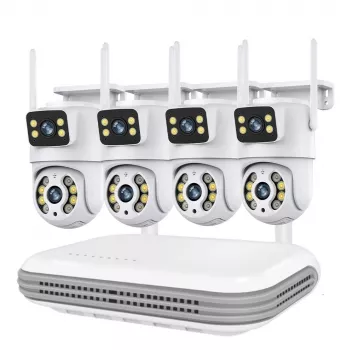
6MP Wireless CCTV Camera System with Dual-Lens and 8CH NVR Audio Kit
A dual-lens wireless camera system paired with an 8-channel NVR can cover wider areas, capture more detail, and keep recordings organized in one place. This guide breaks down how a 6MP dual-lens setup works, what to expect from wireless performance and audio features, and how to install it for reliable everyday monitoring at home or small business locations.
Who This System Fits Best
This style of kit is a strong match when you want fewer cameras doing more work, while still keeping recordings centralized and easy to search.
- Homes needing broader coverage per camera (driveways, front doors, backyards) without adding many extra cameras
- Small businesses that want centralized recording and the option to expand up to the NVR’s channel limit
- Users who want both video and audio capture for better event context (where permitted by local laws)
- Setups where running long video cables is inconvenient, but stable power at camera locations is available
What’s Included and How the Pieces Work Together
Think of the NVR as the “brain” that stores footage and manages playback, while the wireless cameras act as the “eyes” that send video (and sometimes audio) back to the recorder.
- Dual-lens wireless cameras: two lenses can provide complementary views (such as wide overview plus closer detail) depending on the model’s design
- 8-channel NVR: the recording hub that receives camera streams, stores footage, and manages playback
- Audio capability: supports capturing sound along with video for clearer incident review (confirm local compliance before enabling audio recording)
- Network connection: the NVR typically connects to a router for remote viewing, notifications, and time synchronization
| Component | Role | Practical benefit |
|---|---|---|
| Dual-lens cameras (6MP) | Capture video from two perspectives | Wider coverage and better identification at key distances |
| 8CH NVR | Records and organizes camera feeds | Centralized storage and easier playback/export |
| Wireless link (camera to NVR/network) | Sends video without long video runs | Cleaner installs where cabling is difficult |
| Audio support | Adds sound to recordings/alerts | More context for events and interactions |
| Mobile/remote access (via network) | View live and recorded clips remotely | Faster awareness and response when away |
Dual-Lens 6MP Video: What It Means in Real Use
“6MP” refers to the camera’s image resolution. In practical terms, it can deliver sharper subject detail than many older 1080p systems—especially when the scene is well-lit and the camera is positioned with identification in mind.
- More usable detail: 6MP resolution can improve clarity for faces, packages, and vehicle activity compared to lower-resolution systems when placement and lighting are appropriate.
- Fewer blind spots: dual-lens designs can reduce blind spots by combining two angles instead of relying on a single fixed view.
- Better results with sensible mounting: expect the clearest outcomes when cameras are mounted at practical heights and aimed to avoid severe backlight from direct sunrise/sunset.
- Night conditions matter: night performance depends on infrared illumination, ambient lighting, and reflectivity nearby (a white wall close to the camera can wash out the scene).
For areas like a driveway or storefront, a common strategy is using the wider lens to keep context (where someone came from) and the tighter view to help confirm identity or capture hands-on activity near doors and vehicles.
Wireless Performance and NVR Recording Basics
Wireless systems are designed to reduce the hassle of long video cable runs, but they still benefit from basic planning so the video stays stable day to day.
- Wireless typically means video/data transmission: cameras still usually need power at the mounting location.
- Signal obstacles are real: walls, metal siding, appliances, and long distances can reduce signal strength—placing the NVR centrally helps.
- Room to grow: an 8-channel NVR allows adding more cameras later (up to the channel limit), which is useful for scaling coverage over time.
- Reduce dropouts: keep the NVR on a stable network connection and avoid congested Wi‑Fi channels when possible. The FCC’s overview of interference is a helpful reference for troubleshooting crowded wireless environments.
If your property has tricky materials (brick, foil-backed insulation, metal outbuildings), test the camera link quality before drilling holes. A few feet or a different wall path can make a noticeable difference.
Audio Features: When They Help (and When to Disable Them)
Storage, Playback, and Remote Viewing
Installation and Placement Checklist
Recommended In-Stock Options
- 6MP Wireless CCTV Camera System with Dual-Lens and 8CH NVR Audio Kit — an all-in-one approach for multi-angle coverage with centralized NVR recording.
- Calm Your Mind: Guided Meditation Series | Audio Course | Anxiety Relief Meditation — useful if alerts and security events create stress and you want a structured wind-down routine.
- Study Skills Mastery Guide | Digital Study Guide, Learning Strategies eBook, Focus Tips, Study Methods, Memory Techniques, Study Checklist PDF — a practical digital guide for improving focus and routines when you’re managing a home office or small business operations.
Helpful References
- FCC Consumer Guide: Wireless Devices and Interference
- NISTIR 8259A: IoT Device Cybersecurity Capability Core Baseline
- ONVIF: About the ONVIF Standard
FAQ
Do wireless CCTV cameras still need power?
Usually yes. “Wireless” commonly refers to how video/data is transmitted, while the camera still needs local power; stable power and smart placement help keep the connection reliable.
How many cameras can an 8-channel NVR support?
An 8-channel NVR supports up to eight camera channels. Actual pairing depends on compatibility and configuration, so it’s smart to leave a few open channels if you plan to expand later.
Is it legal to record audio with security cameras?
It depends on where you live and whether consent is required. Check local and state/provincial rules before enabling audio, and consider disabling audio or adjusting placement to avoid capturing conversations in public or neighboring areas.













Leave a comment