Wireless Transparent RGB Mechanical Keyboard Buying Guide
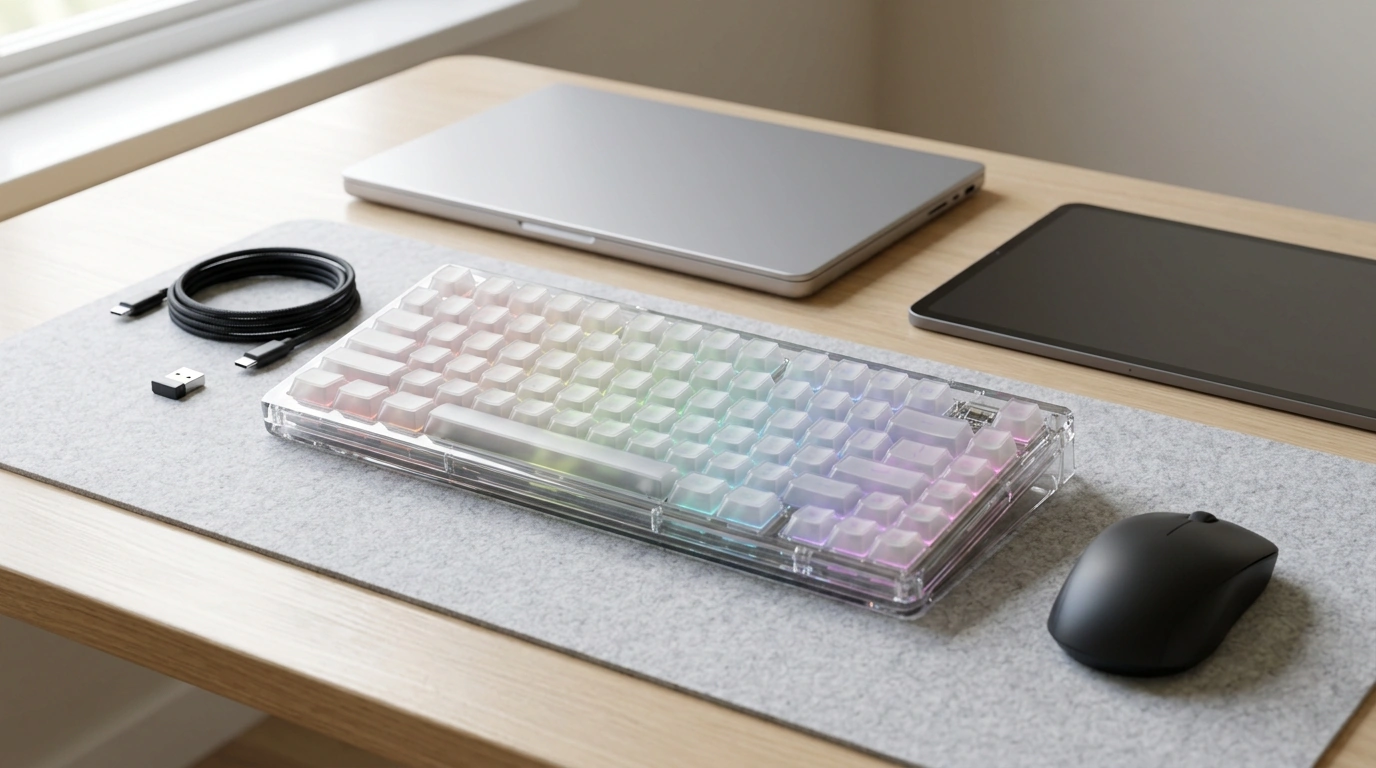
Wireless Transparent RGB Mechanical Keyboard: What Stands Out and What to Check Before Buying
A transparent mechanical keyboard changes more than the look of a setup: it affects how light diffuses, how easily dust is seen, and how the board fits into a clean desk aesthetic. Going wireless adds flexibility for multi-device use and better cable management, but it also introduces questions about latency, charging, and connection stability. This guide highlights what typically matters most with a wireless transparent RGB mechanical keyboard, plus a practical checklist for evaluating fit, feel, and daily usability.
Why a transparent chassis feels different in real use
Light diffusion (and what it reveals)
Clear housings can make RGB lighting look brighter and more evenly spread, especially when the case and surrounding surfaces bounce light instead of absorbing it. The flip side: you may notice LED placement more, including “hotspots” under certain keys or uneven underglow if the lighting zones aren’t balanced.
Visual cleanliness becomes a daily factor
Fingerprints, dust, and smudges tend to stand out on transparent materials. If you like a pristine look, plan on quick wipe-downs more often than you would with an opaque keyboard.
It pairs with almost any desk theme—sometimes too well
Transparent boards can work with nearly any mousepad, PC build, or neutral color palette. If your workspace is minimal, make sure brightness and effects are adjustable so the RGB doesn’t steal the whole scene during work sessions.
Durability expectations are slightly different
Clear plastics can show micro-scratches more readily than solid colors. If you frequently move your keyboard between work and home or pack it in a bag, consider using a sleeve to keep the finish looking fresh.
Wireless essentials: connection, stability, and everyday convenience
Wireless can be freeing—until the connection feels flaky or the battery dies mid-task. Before buying, check what wireless modes are supported and how quickly you can switch between devices.
Connection type and device switching
Many wireless mechanical keyboards support Bluetooth, a 2.4 GHz dongle, or both. Bluetooth is great for laptops, tablets, and phones, while 2.4 GHz is often preferred when you want a more “wired-like” feel. Also look for a clear switching method (button or shortcut) and how many devices can be paired at once. For a deeper technical overview of Bluetooth device interaction, the Bluetooth SIG is a solid reference: Bluetooth HID information (Bluetooth SIG).
Latency and consistency
If you play competitive games, use the lowest-latency, most stable mode available (often a 2.4 GHz receiver when offered). For office work, school, and casual gaming, Bluetooth can feel perfectly responsive when the implementation is solid.
Range, interference, and receiver placement
Crowded wireless environments—routers, headsets, multiple dongles—can cause dropouts. A simple fix is using a front USB port or a short USB extension to place a receiver closer to the keyboard.
Battery, charging, and “use while charging”
Confirm whether charging is USB-C, whether the keyboard can be used while charging, and how much RGB affects runtime. Brightness and complex effects typically reduce battery life the most, so adjustable lighting is more than just an aesthetic feature.
Sleep behavior and wake speed
Sleep settings can make or break daily usability. A keyboard that wakes instantly feels seamless; one that needs a second to reconnect can lead to missed keystrokes, especially on login screens or during fast chat replies.
| What to verify | Why it matters | What to look for on the listing |
|---|---|---|
| Connection modes | Determines device compatibility and flexibility | Bluetooth version, 2.4 GHz dongle support, wired mode |
| Device switching | Smooth multi-device workflow | Dedicated switch button/shortcut; number of paired devices |
| Charging method | Convenience and cable compatibility | USB-C vs micro-USB; cable included; use-while-charging |
| Wake behavior | Avoids missed inputs | Instant wake or low-delay wake noted in details/reviews |
| Lighting impact | Real battery expectations | Runtime estimates with RGB on/off; brightness levels |
Mechanical feel: switches, sound, and long-session comfort
Choose switches for your space, not just the hype
Clicky switches give a pronounced sound and crisp feedback, tactile switches add a noticeable bump without the loud click, and linear switches feel smooth from top to bottom. The best pick depends on noise tolerance, typing style, and whether you share a room with others. For a reputable overview of common switch behavior and terminology, see: Mechanical switch guidance (CHERRY).
Transparent cases can make acoustics more obvious
Keycaps, stabilizers, and layout details
RGB lighting that looks good on a clear build
Brightness control is a must-have
Effects, color accuracy, and legend legibility
Setup tips and care for transparent surfaces
Clean gently, and clean often
Avoid harsh chemicals
Plan for charging without clutter
Who this keyboard style fits best
Product snapshot: Wireless Transparent RGB Mechanical Keyboard
- Availability: In stock (49 units at last update)
- Current price: $153.17 USD (pricing may change)
- Shop: Wireless Transparent RGB Mechanical Keyboard
More in-stock picks to complement a clean setup
- Study Skills Mastery Guide (Digital) for building a more structured work/study routine around your desk time.
- Calm Your Mind: Guided Meditation Series (Audio Course) for quick resets between long typing sessions.
FAQ
Does RGB lighting reduce battery life on wireless mechanical keyboards?
Yes. Brighter lighting and animated effects typically drain the battery faster, while lowering brightness or turning RGB off can extend runtime significantly.
Is Bluetooth good enough for gaming on a wireless mechanical keyboard?
It depends on the game and the keyboard’s implementation. For competitive play, many users prefer the lowest-latency, most stable option available (often a 2.4 GHz dongle if offered), while Bluetooth is usually comfortable for casual gaming and everyday use when stable.
How do you clean a transparent keyboard without scratching it?
Use a microfiber cloth with gentle pressure, clear dust with compressed air, and avoid harsh chemicals. A mild soap-and-water damp cloth is typically safer for clear plastics than strong cleaners.












Leave a comment